Professional live stream graphics for grassroots cricket
Broadcast-quality scorebar, player cards, replays, and AI commentary — free, open source, and built for volunteers.
LIVE

Broadcast-quality scorebar, player cards, replays, and AI commentary — free, open source, and built for volunteers.
Rewritten from the ground up as a single app. No Python, no installer, no command windows — download one file, double-click it, and it sets itself up. Everything the graphics did before, plus a lot more.
Asks which computer it's on, walks you through setup with a live preview of your stream, then runs match day and the control panel in one window.
New Franchise, Neon and Block looks inspired by the big T20 leagues — with matching wicket cards, over summaries and scorecards.
Badges, player photos, sponsor logos and match photos are added from the control panel — even from a phone. No folders, no renaming files.
Finds the club's IP cameras on the network, installs OBS if it's missing, and pairs the scorer's laptop with a short code.
A pre-match check of every login and connection, and Windows notifications if the scorer's feed goes quiet or OBS crashes mid-match.
When a new version is out, one click downloads it, checks it and restarts — settings and pictures untouched. Move to a new laptop with one exported file.
Released as a beta while it gets its first matches — the proven v2.12 stays available. Everything that's new →
Not a mock-up — this is a Saturday league game, filmed on one camera, with the graphics driven live by the scorer's own software.
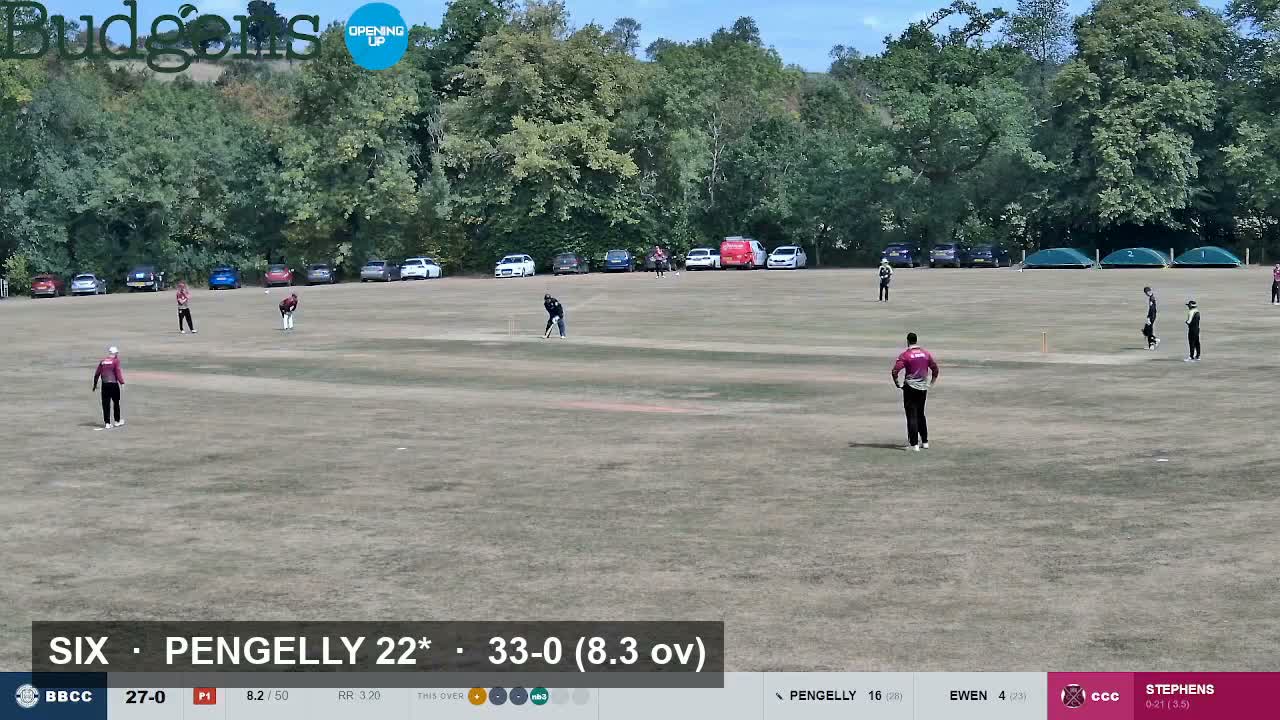
Bridestowe & Belstone CC — scorebar, highlight captions and replay tagging, all generated automatically.
All the graphics you see on broadcast cricket, driven automatically by your scorer's laptop.
Always-on bottom bar with score, overs, both batters, bowler figures, run rate and a ball-by-ball ticker — updating on every delivery. Seven styles — from understated to big-league T20, neon and bold flat blocks — all in your club colours.
Photo and season batting average slide in when a new batter arrives, pulled live from PlayCricket for both your side and the opposition.
Wickets, boundaries, and milestones replay automatically via the OBS replay buffer, with a full-screen transition.
Optional Sky Sports-style analysis at the end of every over, generated live by Claude AI from the actual match situation.
Generate a polished Instagram result graphic for any match — home or away — with top batter, bowler, and match-day sponsors.
Responsive control panel runs on any device over Wi-Fi. Manage the stream from your phone on the boundary.
Every delivery is logged to a local SQLite file as you stream — your own season-long dataset, exportable to CSV.
Broadcast-style card at the innings break with all batters, dismissals spelled out in full, and bowling figures.
Live Duckworth-Lewis par score when rain is forecast. Drinks-break weather widget from Open-Meteo.
Three pieces of free software, already working together in minutes.
The scoring software writes a file on every ball. Nothing changes for the scorer.
CricketStream — one small app, nothing to install — runs on the streaming laptop, reads the scorer's file every few seconds, parses the ball data, and serves it to the overlay.
The overlay is a browser source inside OBS. It polls the server and renders all the graphics — OBS sends the combined picture to YouTube.
The control panel opens in CricketStream's own window when match day starts — or on your phone, by scanning its QR code — to set opposition details, toggle graphics, add badges and photos, and run replays.
All software is free. You probably already have most of this.
One file, nothing to install. Put it in a folder of its own and double-click it — it asks which computer this is and sets itself up.
Every version is on the releases page.
v3 is in beta. Until code signing is set up, Windows asks once before it runs (More info → Run anyway). The proven Python edition is on the python branch.
Pick your platform for the full setup guide — each starts with a fast path to get you streaming in under 30 minutes.